
From our collective experience as developers, we know that there are those off-the-cuff thoughts of creating a personal app that, in a way, are quite innovative. Be it a customised application for a specific workflow, a tracker for a new hobby, or a project intended to make life easier.
Well, it seems like GitHub is listening. They recently announced a brand new feature in technical preview called GitHub Spark, and it is precisely targeted towards resolving this issue. I have been looking into the details, and it is one of the most promising things I have seen in a while in the area of personal software engineering.
As such, this is a personal piece documenting my initial impressions of what Spark is, how it functions, and my perspective on its potential impact on developers like us.
What Would GitHub Spark Be In Summary?
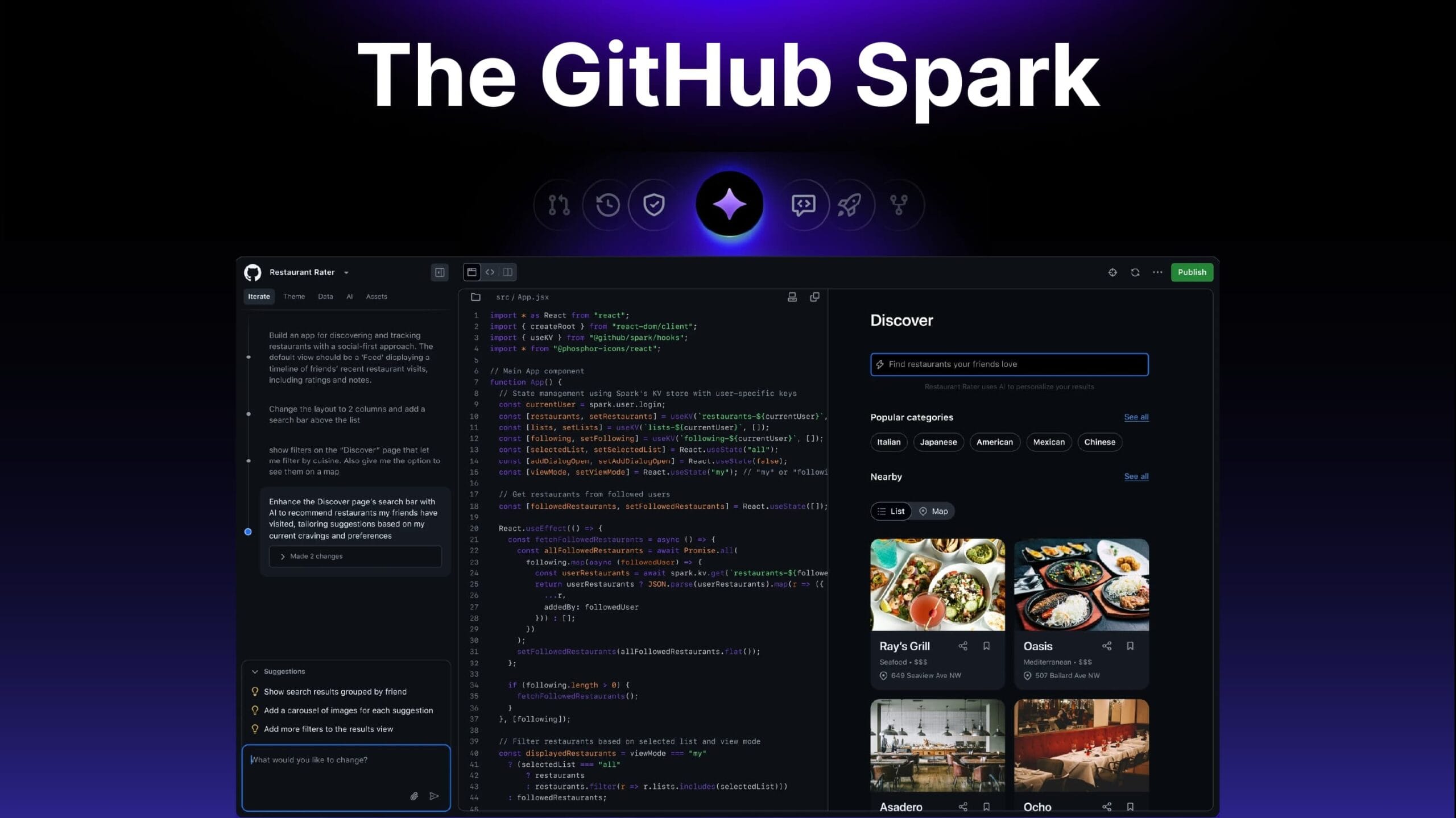
GitHub Spark is, in essence, a platform where you can create, develop, and distribute intelligent full-stack “micro apps” using AI with very minimal configuration. The entire concept revolves around “micro apps,” which are apps designed to do one very precise task and are optimised for your requirements.
The turn this is for is very interesting. GitHub is very clear that Spark is intended for literally everyone and that it can be used by someone with no coding experience, and even by advanced software developers who want to dive into the code and tweak literally anything deeply.
The Core Features: How is it Possible to Create Apps Using Natural Language with GitHub Spark?
How is it possible? That is the most interesting part. Spark integrates a natural language interface with a self-hosted backend, which means that the traditional DevOps bottleneck for small projects is completely eliminated.
Your Editor is a Natural Language Interface
Creating an application in Spark is as easy as stating what you want. You start with a prompt, and Spark actively generates a functioning app for you. You continue to iterate and refine your app by stating the changes you envision. This forms the “app-centric feedback loop” in which your ideas are realised in real-time, interactive, and instant previews. You can also ask for “variants”, which generate alternate versions of your request, making it easy to explore your ideas when clarity is lacking.
The Managed Runtime (The “Magic” Part”)
This is the section that removes all barriers to progress. With a Spark application, you are hosted and run in a fully managed Spark environment, which takes care of everything. This covers:
- No build pipelines: With deployment-free hosting, you no longer need to build pipelines, as every modification is instantly live.
- No configuration: With integrated persistent data storage, you no longer need to set up a database as your app is automatically provisioned with a key-value store.
- Generative AI apps: You can now easily add generative AI features to your apps with powered models from OpenAI (GPT-4o) and Anthropic (Claude 3.5 Sonnet).
Seamless Integration with the GitHub Ecosystem
Spark doesn’t restrict you solely to the natural language features, as it is well-connected with everything you are familiar with. In fact, you can launch your Spark application in either VS Code or Codespaces, and with GitHub Copilot, you can get assistance writing your code. Furthermore, you can create a standard GitHub repository in just one click.
What Can You Actually Build with Spark?
These tools are not just for building simple to-do lists. The official examples display a surprisingly wide range of applications. The primary use cases they highlight are:
- Rapid Prototyping: As the saying goes, a picture is worth a thousand words, and in this case, a functional prototype really is worth a thousand words. You can create realistic prototypes in minutes that can easily be shared and will get you a lot of valuable feedback.
- Personalised Apps: You can design and create your own AI-driven workout or meal planners, which help you track your daily routine.
- SaaS Launchpads: Build a minimum viable product to test your business idea with actual customers to see how it performs in the real-world market.
- Interactive Websites: Move beyond static site builders and design and develop portfolios and landing pages that are enhanced with AI features.
In the most recent GitHub Next post, the team showcased some very interesting projects, including a kids’ allowance tracker that celebrates milestones using LLMs and a bespoke HackerNews reader that generates summaries of comment threads. There is so much flexibility and potential for building very personal and helpful applications.
How to Get Access and What the Cost Is
Currently, GitHub Spark is a technical preview that can be accessed through GitHub Next. Access is gated with a GitHub Copilot Pro+ subscription.
This plan is available for $39 a month and comes with a cap of 375 “Spark messages.” A “Spark message” is any prompt that you have provided for the AI to create or edit your application.
As always, we include the answer to your recurring requests below.
What is GitHub Spark?
An all-in-one AI-driven GitHub Spark offers a one-stop shop for constructing and launching smart “micro apps,” with no requirement for prior configuration using natural language, visual interfaces, or code.
Do I have to be a coder to use Spark?
Not at all. Spark is built for users of any technical proficiency, but if you’re a coder, you can edit the TypeScript and React code to your liking.
What specific AI models are (did) being (used) used?
Some of the powerful models that are selectable, like GPT-4o, Claude 3.5 Sonnet and others are available with their use.
With the help of this tool, software can be made personal and tailored in an easy manner. It is much more than a simple code generator that we have been considering it to be.
I am very thrilled about the future of GitHub Spark, and we know that there is a lot more to come. If you want to know more, you can explore GitHub Next. If you had the chance to create a micro app, what would you start with? I would love to hear your thoughts in the comments.