
Are you tired of copying and pasting the exact same system instructions, brand guidelines, and code formatting rules every time you start a new AI chat? If you are a developer or digital marketer, manual prompting is draining your productivity.
What Are Anthropic Claude Skills?
At their core, Anthropic Claude Skills are modular, reusable instruction packages that teach the AI how to handle specific tasks consistently.
Instead of writing a massive prompt every session, a Skill is simply a folder on your computer that contains a SKILL.md file. This markdown file holds the YAML frontmatter (the metadata that tells Claude when to trigger the skill) and the step-by-step instructions.
When you ask Claude a question, it dynamically scans your available skills and automatically loads the exact instructions, reference files, or scripts required to complete the job. It’s like giving your AI assistant its own specialized training manual for web development, content writing.
Why You Need Claude Skills in Your Workflow
If you are serious about efficiency, treating your AI like a blank slate every day is a mistake. Here is exactly why you need to adopt this ecosystem:
- Saves Massive Amounts of Time: Never type out your WordPress coding standards or SEO content frameworks again. Trigger them instantly.
- Guarantees Consistency: Claude follows your exact Standard Operating Procedure (SOP). If you have a skill for reviewing pull requests, the AI will check the exact same parameters every single time.
- Drastically Reduces Token Usage: Claude uses “progressive disclosure.” It only loads the
SKILL.mdfile into its memory when the specific task is triggered, keeping your context window clean and saving API costs. - Seamless Portability: You can use these exact same skill folders across Claude.ai, the Claude Code CLI, and third-party tools like Cursor.
How to Use or Install Skills from the Official GitHub
You don’t have to build everything from scratch. Anthropic provides a massive library of pre-built, production-ready skills on their official website and repository.
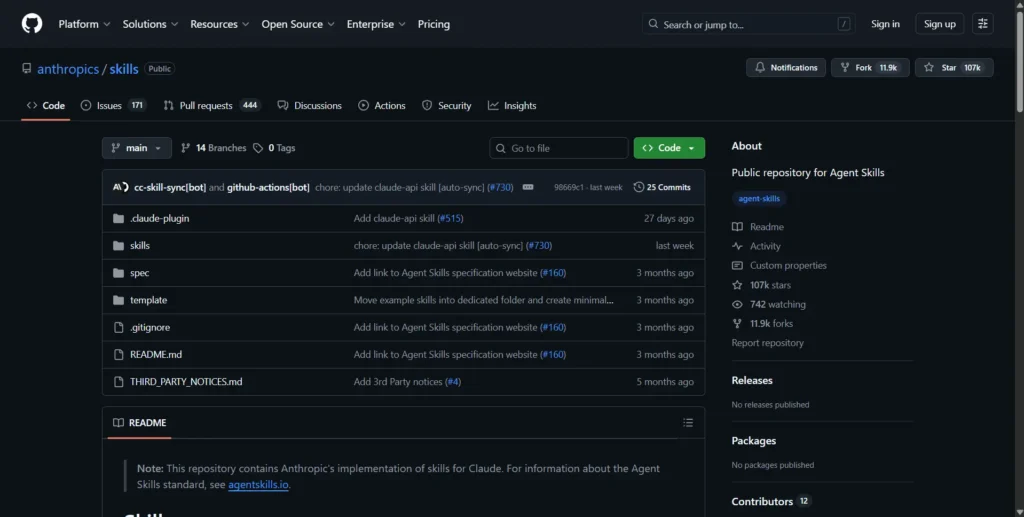
Visit the Official Repository: Head over to the official Anthropic Skills GitHub at https://github.com/anthropics/skills
You can either:
- Clone the repository
- Download ZIP
- Copy specific skill folders
These skills contain a SKILL.md file that Claude can use.
Add Skills Marketplace (Recommended)
Run this command in Claude CLI to add the official skills marketplace:
/plugin marketplace add anthropics/skillsThis will make all official Claude Skills available directly inside your CLI.
Then you can browse and install skills easily.
Build a Skills with Claude (CLI)
1. Setup
Create a project folder and start Claude:
claude
2. Install Skill Creator
Open plugins and install skill-creator:
/pluginsRestart Claude:
/exit
claude
3. Create Developer Skill
Run:
skillThen describe:
Create an SEO assistant that analyzes content, improves on-page SEO, and generates optimized titles, meta descriptions, and keywords. The skill reviews your blog posts, suggests heading structure, improves readability, and ensures proper keyword placement. Claude automatically creates the SEO skill, asks setup questions, and runs tests to make sure your SEO assistant works correctly.
4. Use the Skill
Add your code file and run:
/dev-assistant @file.jsYour AI developer assistant will:
- Review code
- Fix bugs
- Optimize performance
- Generate components
How to Use Claude Skills
Once installed, Claude Skills can be used in two ways:
Method 1: Automatic Triggering
Claude automatically detects when a skill is relevant and loads it based on your request.
Example:
“Build a hero section for SaaS website”
Claude may automatically use a frontend-design skill.
Method 2: Direct Invocation
You can directly call the SEO skill using a slash command:
/seo-assistant Optimize this full website for SEO. Generate meta titles, descriptions, keywords, fix technical SEO issues, and improve content structure.Actionable Tips for Mastering Skills
Ready to become a power user? Use these pro-tips to get the most out of your automation:
- Use the
skill-creator: Anthropic actually provides a meta-skill calledskill-creator. You can ask Claude to “use the skill-creator to help me build a WordPress custom post type workflow,” and the AI will generate the perfectSKILL.mdboilerplate for you. - Keep Them Micro: Don’t build one giant skill that does ten different things. Build small, hyper-focused skills (e.g., one for keyword research, one for drafting metadata). Claude is smart enough to chain multiple skills together for complex tasks.
- Leverage Reference Files: Your skill folder isn’t limited to one markdown file. Create a
/referencesfolder inside your skill directory to hold large API documentation, brand style guides, or CSV data, and link to them in yourSKILL.md.
Frequently Asked Questions (FAQ)
Do I need to know how to code to use Claude Skills?
Not at all! While developers can add Python scripts to their skills, the core of a skill is just plain text written in a markdown (SKILL.md) file. If you can write an SOP, you can build a skill.
Are Anthropic skills free to download?
Yes, the official repository provided by Anthropic on GitHub is completely free and open-source. However, using them within Claude may require standard API token usage or a Claude Pro subscription depending on your platform.
Can I make my own Claude skill?
Yes! You can easily create your own skills by setting up a local folder containing a SKILL.md file with YAML frontmatter and your custom instructions. You can do this manually or by using the skill-creator tool provided by Anthropic to generate the boilerplate.
Conclusion
The era of manual, repetitive AI prompting is over. By leveraging Anthropic Claude Skills, you can transform your AI assistant into a highly specialized, reliable agent that strictly adheres to your workflows. Whether you download pre-built solutions directly from the official Anthropic GitHub or build your own custom markdown files, integrating skills is the ultimate way to scale your output, save tokens, and eliminate errors.
Don’t wait—download your first skill today and watch your productivity skyrocket.